- The FutureProof Advisor Newsletter
- Posts
- Thursday Post: Claude in Powerpoint
Thursday Post: Claude in Powerpoint
Happy Thursday,
AI isn’t slowing down—and neither should we. This newsletter is your shortcut to practical ideas and smarter strategies to grow, lead, and adapt as tech reshapes our industry.
To take it one step further, I’ve launched a new YouTube series. Each month, I’m sharing quick, tactical videos showing how advisors can use tools like ChatGPT to save time, think better, and scale more efficiently—starting with the work you're already doing.
Watch my latest episode here
The AI Edge
Helping advisors scale from 1 person to many people.
AI Application:
Claude.ai & Powerpoint

Overview:
If you've spent any time avoiding PowerPoint in favor of tools like Visme or Canva, this might change your mind. Microsoft has integrated Claude directly into PowerPoint as a plugin, and it's doing something genuinely useful - it's not just generating filler content, it's actually building structured, branded slide decks for you.
You direct Claude how you want the deck built and what style you want (which could include your own brand elements) and it builds the deck for you. Then you can feed it the content you want to populate the deck and voila, the deck is created.
It's working inside your actual PowerPoint file, not exporting something you have to reformat. The slides live where you need them.
How to apply Claude within Powerpoint to the business today:
Brand your templates once, use them forever. Upload your hex codes, logo, and font preferences and have Claude build a master slide template. Every presentation your team creates from that point forward starts from a consistent visual foundation.
Convert equity research into investment committee decks. Paste in an AI-generated or analyst-written equity analysis and have Claude structure it into a 10-12 slide deck with logical flow - thesis, valuation, risks, bull/bear cases - without touching a single slide manually.
Build client review presentations from financial plan summaries. Take your planning software's output or a written summary and let Claude organize it into a structured client-facing presentation, then spend your time on the message, not the formatting.
Create onboarding and educational content faster. Need a slide deck explaining your investment philosophy or walking a new client through your planning process? Draft the content in a document, feed it to Claude, get a starting deck in minutes.
Free up your marketing or operations team. If someone on your team spends hours reformatting decks or building presentations from scratch, this changes that equation significantly - they can focus on refining and personalizing rather than building from zero.
Advanced:
Build a library of Claude-ready content blocks. Develop standardized written summaries of your core investment views, planning strategies, and firm positioning that can be dropped into Claude at any time to generate updated presentations without starting from scratch.
Create a systematic equity analysis presentation workflow. Pair an AI research tool (Gemini, You.com, Claude itself) with this PowerPoint integration - research gets generated, then immediately structured into a branded deck ready for internal review or committee presentation.
Develop tiered presentation templates for different audiences. Maintain separate Claude templates for investment committee presentations, client reviews, and prospect meetings - each with appropriate depth, branding, and structure built in from the start.
Integrate with your compliance workflow. Use Claude to generate a first draft deck from compliant, pre-approved written content, reducing the risk of off-script messaging while still creating personalized-looking materials at scale.
What could this application mean for the future of our business?
For a long time, the quality of a firm's client-facing materials depended heavily on whether they had a marketing person, a designer, or enough hours in the week to make something look professional. That's been a real disadvantage for smaller teams competing against larger firms with dedicated resources.
What's changing here is that presentation quality is becoming less about headcount and more about workflow design. If you build the right templates and content inputs, a one-person team can produce committee-ready analysis decks and polished client presentations on the same timeline a larger firm's marketing department can.
There's also something worth watching in how clients are going to start perceiving presentation quality. As these tools become more common, the baseline expectation for visual communication is going to rise. The advisors who figure out how to produce consistently professional materials efficiently will hold an edge - not because of the slides themselves, but because it signals organization, attention to detail, and a modern operation. The actual work still matters most. But how you present it is going to matter more than it used to, and the cost of doing it well is dropping fast.
See Claude & Powerpoint in action:
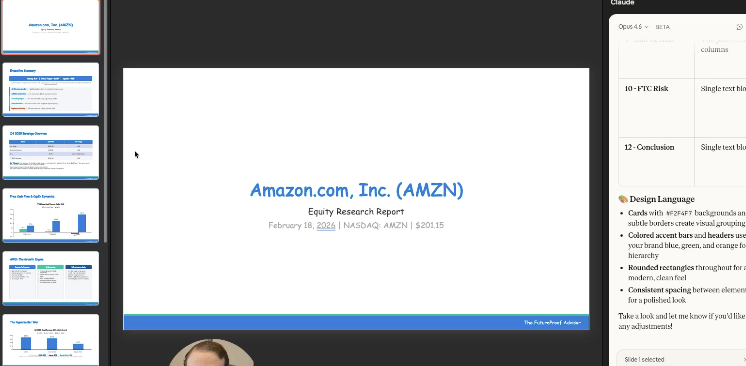
In this demo, I start with a blank PowerPoint and walk through building a fully branded equity analysis deck from scratch - live, with no preparation. I upload my hex codes and logo, watch Claude construct the template, then paste in a full Amazon equity analysis and let it build a 12-slide investment committee presentation in real time.
One of those moments that gave me pause was when Claude couldn't embed the logo correctly, it didn't fail - it adapted, placing the firm name in the footer and moving on. That's not something most tools do. Watch how the slides evolve from rough first draft to genuinely usable presentation after one round of feedback, and you'll start seeing exactly where this fits in your workflow.
-Matt
Do you feel that this tool can add value in your business today? |